Showing posts with label Flexmls. Show all posts

Tuesday, March 24, 2015

Search for Co-Listing/Co-Selling Office from Quick Search

On March 24, you will be able to search by Co-Listing and Co-Selling Office when you are using a Quick Search.

When in a Quick Search on the Edit Search tab, Co-listing and Co-selling Office will be available as options to select in the Listing/Selling Office field.


If the Listing/Selling Office field is not already on your Quick Search template, you can add it by clicking in the Add a field to the search box and selecting it from the available fields. 


View Export Options from Search Results Screen

On March 26, you will be able to more easily access a listing's export options from a search results screen.

To view export options for a listing for which you have editing rights, click on the triangle drop-down icon and select View Listing Exports


This link will take you to the Export Tab on the Change Listing screen and you can quickly check to see which Seller Opt Outs have been selected for the listing's export options. 


Monday, February 23, 2015

New Market Share Option

New Market Share Option under Saturation Report in FlexMLS

Currently, Brokers have a tool titled Market Share under the Saturation Report which will rank members/offices/companies within the MLS based on selected criteria.  On March 3, a new option will be added to the Market Share program titled "Rank Members in Office".

Brokers will be able to rank their members by Status and/or Number of Transactions or Dollar Volume for a given time frame.

Click for details on how to run the Market Share Report.

New Photo Upload and Edit Screen

New Photo Upload & Edit Screen coming to FlexMLS

A new photo upload and edit page will be available in FlexMLS,on March 2nd.  The new photo page will make it easier for you to rearrange your photos and add titles/captions.

Rearrange Photos
After you have uploaded your photo(s), a number will appear in the upper left corner indicating the order number.  You can either click an drag your photos to rearrange or click on the number and select the desired position.

Adding Titles & Captions
To add a title or a caption to your photo, hover over the title bar or the caption bar of the photo and click on the pencil.  The green check mark will save your changes.

Designating a Primary Photo
To designate a photo as Primary, click on the flag icon.  The current primary image will be indicated by the highlighted flag icon as well as a blue outline surrounding the photo.

Rotate/Replace/Delete Listing Photos
To the right of each photo is a menu of icons.  the arrows will allow you to rotate the photo, there is an upload icon for replacing the photo, and you also see a trash can icon which of course will delete the photo.

When you are finished editing photos, click on the Return to edit your Listing link in the upper left corner of the page.  All changes to the photos will automatically be saved.

Click here for more detailed instructions and illustrations on how the new screen will appear and function.

If you have any questions, please contact Technical Support at (904) 394-9494 x 1605.

Monday, January 26, 2015

A Message from Gonzalo Mejia, 2015 NEFMLS President- Looking Forward to 2015

Happy New Year to all of our Members!

First, I want to thank all of the 2014 Northeast Florida, Inc. Board of Directors.  Their dedication to making our organization one of the best in Florida has laid the groundwork for a successful 2015.  I especially want to thank those individuals who served their last term in 2014; Charles Kassaw  Coldwell Banker Vanguard Realty (2014 President), Roy Orren Marketmasters of the Southeast (2014 Secretary), and Stan Bishop Exit Real Estate Gallery, Director.  Please extend your welcome to the new 2015 Directors; Jeanne Eisenstein Coldwell Banker Vanguard Realty, Laura Evans Magnolia Properties of Jacksonville, and Jamie Huggins Coldwell Banker Vanguard Realty.  Click here for a complete list of the 2015 NEFMLS Board of Directors. 
Lastly, I want to thank our Metro Market Trends, Inc. (MMT) Board of Directors as well President Gene Jones, Vice President Dee Bumbarger and Directors Andre Boutte, Dave Rifkin and Glenn East.

We are all very excited about the new changes coming to our MLS and MMT in 2015.

We kicked off the year going mobile.  Currently we are able to offer our members two mobile apps to access all the listing data including private information such as showing instructions, private remarks, and more.  We partnered with REALTOR.com to bring you the Find app.  Find integrates with your REALTOR.com profiles, setting, and includes a real time customer communication feature.  Flexmls has had an iPhone app available since last year and just recently released their Android version.  The Flexmls app integrates with your MLS system contacts, saved searches, and listing collections.  You can also make changes to list price and add photos direct from this app.  Both apps are powerful resources providing you private information so that you can promptly service your customers.

At the end of the first quarter, you will have access to a new service offering valuable information on our Condominium listings.  Each condo unit will include a floor plan, basic information about the condominium building such as how many units, how many units for sale, and detailed market information.  This service will be available for all condominium complexes in Baker, Clay, Duval, Nassau, Putnam, and St. Johns counties.

Metro Market Trends, Inc. continues to make enhancements to their subscription based software MMT SearchNet, including displaying active, pending and sold listing information on the maps for NEFMLS members. Soon we will be releasing both Android and IOS apps that will allow SearchNet subscribers to access information on properties all over Florida.

We continue to work with Flexmls on enhancements and improvements to the MLS system.  Adding Details to our Views is the most recent enhancement.  Soon you find a new link on the Member Search results page that will enable you to view that member’s REALTOR.com profile. 
2015 will be our year for improving communications with our members.  There are always changes occurring in our industry as well as the flexmls system changes and we want to be sure you are informed.  Listing syndication to third party sites (such as Zillow) and its upcoming changes is just one example of where communication with you, our members, is very important to the MLS, the Board of Directors, and your business.  

We would also like to hear from you.  If would like to submit an article or an idea for an article, please send to mlsnews@realtyweb.net.  

I am honored to serve as your 2015 Northeast Florida MLS, Inc. President and excited to be a part of all the upcoming events to benefit our members.

Monday, January 19, 2015

NEW flexmls Feature Release: Details On Views

You now have the ability to add Detail fields (such as pool, parking etc.) to Views in Flexmls.

Just as before, a View is the set of columns of information that appears on the List tab on a Search Results screen. To create and modify views, go to My Views under Preferences or click on View on the Search Results page.

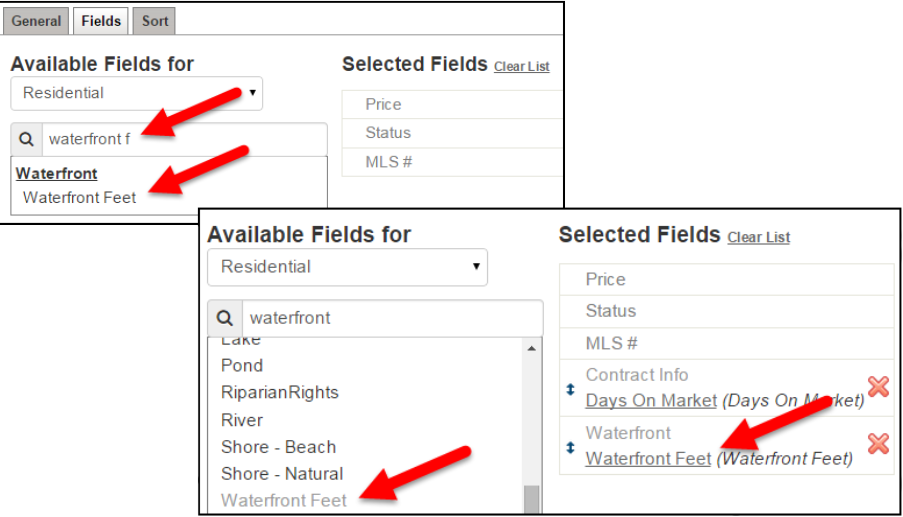
To add a Detail field to the view, click on the Fields tab. The Available Fields column on the left side contains Main fields and Detail fields that your MLS has made available for use in Views. 
The fields are arranged under Group headings and you can scroll through the fields or type a field name into the search box.

Click on the field in the Available Fields column to add it to the Selected Fields list. Once chosen, the field will appear in the Selected Fields list and will also show the name of the Group to which is belongs. The field name will also remain under Available Fields, appearing in light grey type. If you want, you can reorder and rename the fields in the Selected Fields list.

After adding or changing the fields, make sure to click on Save at the top right. After saving, you will be brought back to the My Views page where your new view will be available in the list, or back to your Search Results page. You may now use this View on any search results page.

Note: You cannot sort on a Detail field on the List tab. When a detail field appears on the List tab, it appears in black text indicating that the column header is neither clickable nor sortable. Only Main fields are able to be sorted on the List tab.