Showing posts with label Updates. Show all posts
Tuesday, March 24, 2015
New Customer Auto E-mail format!
Beginning March 26th, the Auto E-mails that you send to your customers will now have a thumbnail link instead of a plain direct link. (When this is enabled, the photos in the auto emails will only show if the user has their auto email event set up for HTML, not text. You may have to go to Preferences>General Settings to make it your default setting).
With this new Auto E-mail preview, you can engage with your customers more effectively and more efficiently. The new design of the e-mails will bring more value to the listing information you are delivering!
Monday, February 23, 2015
New Market Share Option
New Market Share Option under Saturation Report in FlexMLS
Currently, Brokers have a tool titled Market Share under the Saturation Report which will rank members/offices/companies within the MLS based on selected criteria. On March 3, a new option will be added to the Market Share program titled "Rank Members in Office".
Brokers will be able to rank their members by Status and/or Number of Transactions or Dollar Volume for a given time frame.
Click for details on how to run the Market Share Report.
Brokers will be able to rank their members by Status and/or Number of Transactions or Dollar Volume for a given time frame.
Click for details on how to run the Market Share Report.
New Photo Upload and Edit Screen
New Photo Upload & Edit Screen coming to FlexMLS
A new photo upload and edit page will be available in FlexMLS,on March 2nd. The new photo page will make it easier for you to rearrange your photos and add titles/captions.
Rearrange Photos
After you have uploaded your photo(s), a number will appear in the upper left corner indicating the order number. You can either click an drag your photos to rearrange or click on the number and select the desired position.
Adding Titles & Captions
To add a title or a caption to your photo, hover over the title bar or the caption bar of the photo and click on the pencil. The green check mark will save your changes.
Designating a Primary Photo
To designate a photo as Primary, click on the flag icon. The current primary image will be indicated by the highlighted flag icon as well as a blue outline surrounding the photo.
Rotate/Replace/Delete Listing Photos
To the right of each photo is a menu of icons. the arrows will allow you to rotate the photo, there is an upload icon for replacing the photo, and you also see a trash can icon which of course will delete the photo.
When you are finished editing photos, click on the Return to edit your Listing link in the upper left corner of the page. All changes to the photos will automatically be saved.
Click here for more detailed instructions and illustrations on how the new screen will appear and function.
If you have any questions, please contact Technical Support at (904) 394-9494 x 1605.
Rearrange Photos
After you have uploaded your photo(s), a number will appear in the upper left corner indicating the order number. You can either click an drag your photos to rearrange or click on the number and select the desired position.
Adding Titles & Captions
To add a title or a caption to your photo, hover over the title bar or the caption bar of the photo and click on the pencil. The green check mark will save your changes.
Designating a Primary Photo
To designate a photo as Primary, click on the flag icon. The current primary image will be indicated by the highlighted flag icon as well as a blue outline surrounding the photo.
Rotate/Replace/Delete Listing Photos
To the right of each photo is a menu of icons. the arrows will allow you to rotate the photo, there is an upload icon for replacing the photo, and you also see a trash can icon which of course will delete the photo.
When you are finished editing photos, click on the Return to edit your Listing link in the upper left corner of the page. All changes to the photos will automatically be saved.
Click here for more detailed instructions and illustrations on how the new screen will appear and function.
If you have any questions, please contact Technical Support at (904) 394-9494 x 1605.
Monday, February 16, 2015
Zillow lands more direct listing feeds
Portal will get 67,000 listings from 2 Florida MLSs
Two Florida multiple listing services have agreed to send top real estate portal Zillow a direct feed of their combined 67,000-plus listings.
The deals come as Zillow is scrambling to obtain listings directly from brokers and MLSs before the expiration of its agreement with Move-owned listing syndicator ListHub on April 7. Zillow rival Realtor.com, also operated by Move, already obtains listings directly from virtually all of the nation's MLSs through it's agreement with the National Association of Realtors.
Announced today, the Jacksonville-based Northeast Florida Multiple Listing Service, also known as RealtyWEB.Net, has joined Zillow's direct feel program, the Zillow Partnership Platform, to send its more than 15,000 residential listings (more than 1,600 of them rentals) directly to Zillow on behalf of it's 6,000 members.
"Zillow is providing a service to a significant portion of our members," said Ron Stephan, CEO of NEFMLS, in a statement.
"A direct relationship will improve the quality of our listings data and ensure the timeliness that is crucial to real estate, especially in terms of price and status updates."
Further south along Florida's Atlantic coast, the Jupiter-Tequesta-Hobe Sound Association of Realtors has also agreed to send Zillow a direct feed of its more than 52,000 active residential listings, including 24,000 single-family homes, 24,000 condominiums and 4,000 townhomes.
The state's largest MLS, My Florida Regional MLS, agreed to proved Zillow a direct feed in December.
Listing agents whose MLSs participate in the Zillow Partnership Platform are prominently displayed on all of their listings, and listing brokers receive attribution, branding, a link back directly to their websites and access to daily analytic reports, the company said. Listings are updated on Zillow as often as every 15 minutes.
In addition, NEFMLS will receive a direct link to its MLS website in the rare cases that a broker does not have a website; full analytic reports for its listings; and credit and branding to the MLS, Stephan said.
"This region of Florida is incredibly attractive to buyers-which is great for sellers," said Curt Beardsley, Zillow Vice President of industry development, in a statement.
"Now that JTHS is sending listings directly to Zillow, sellers will be assured their listings are being seen by the many shoppers looking for their new home."
A large share of JTHS brokers previously syndicated to Zillow via ListHub, and that drove the decision to syndicate directly from the MLS, JTHS MLS CEO Wes Wiggins and NEFMLS's Stephan told Inman.
JTHS and NEFMLS expect to continue their current agreements with ListHub for listing syndication to other third-party portals, Wiggins and Stephan said.
Both MLSs will also deploy the recently launched Zillow Data Dashboard, a free listing management and reporting platform that the company says puts more control over listings in the hands of MLS members and brokers.
The dashboard allows brokers to opt in or out of sending their listings to Zillow with one click; keep customized MLS fields; set lead routing rules; include links to individual listing pages on their website; and get free daily reports of listing performance metrics such as search result impressions, total listing views and total leads delivered.
Zillow has declined to disclose the number of MLSs that are part of the Zillow Partnership Platform, putting the figure at "dozens". Last month, the nation's second most popular real estate listing portal, Trulia, announced it had signed direct feed agreements with 125 MLSs, though Trulia's agreement wiht ListHub does not expire until June 2016.
Zillow is set to aquire Trulia any day now, and when it does Zillow CEO Spencer Rascoff has said the company plans to combine the portals' listings into one database. Rascoff said Zillow's MLS contracts typically allow it to share listings with sites it owns, which will include Trulia.
Trulia exec Alon Chaver said Trulia would abide by its contractual obligations with MLSs after the merger, but declined to say whether those agreements would or would not allow the listings Trulia obtains from MLSs to appear on Zillow.
Editors Note: This story has been updated with comments from NEFMLS's Ron Stephan and Trulia's Alon Chaver.
Questions, corrections, news tips? Send them to andrea@inman.com
Two Florida multiple listing services have agreed to send top real estate portal Zillow a direct feed of their combined 67,000-plus listings.
The deals come as Zillow is scrambling to obtain listings directly from brokers and MLSs before the expiration of its agreement with Move-owned listing syndicator ListHub on April 7. Zillow rival Realtor.com, also operated by Move, already obtains listings directly from virtually all of the nation's MLSs through it's agreement with the National Association of Realtors.
"Zillow is providing a service to a significant portion of our members," said Ron Stephan, CEO of NEFMLS, in a statement.
"A direct relationship will improve the quality of our listings data and ensure the timeliness that is crucial to real estate, especially in terms of price and status updates."
Further south along Florida's Atlantic coast, the Jupiter-Tequesta-Hobe Sound Association of Realtors has also agreed to send Zillow a direct feed of its more than 52,000 active residential listings, including 24,000 single-family homes, 24,000 condominiums and 4,000 townhomes.
The state's largest MLS, My Florida Regional MLS, agreed to proved Zillow a direct feed in December.
Listing agents whose MLSs participate in the Zillow Partnership Platform are prominently displayed on all of their listings, and listing brokers receive attribution, branding, a link back directly to their websites and access to daily analytic reports, the company said. Listings are updated on Zillow as often as every 15 minutes.
In addition, NEFMLS will receive a direct link to its MLS website in the rare cases that a broker does not have a website; full analytic reports for its listings; and credit and branding to the MLS, Stephan said.
"This region of Florida is incredibly attractive to buyers-which is great for sellers," said Curt Beardsley, Zillow Vice President of industry development, in a statement.
"Now that JTHS is sending listings directly to Zillow, sellers will be assured their listings are being seen by the many shoppers looking for their new home."
A large share of JTHS brokers previously syndicated to Zillow via ListHub, and that drove the decision to syndicate directly from the MLS, JTHS MLS CEO Wes Wiggins and NEFMLS's Stephan told Inman.
JTHS and NEFMLS expect to continue their current agreements with ListHub for listing syndication to other third-party portals, Wiggins and Stephan said.
Both MLSs will also deploy the recently launched Zillow Data Dashboard, a free listing management and reporting platform that the company says puts more control over listings in the hands of MLS members and brokers.
The dashboard allows brokers to opt in or out of sending their listings to Zillow with one click; keep customized MLS fields; set lead routing rules; include links to individual listing pages on their website; and get free daily reports of listing performance metrics such as search result impressions, total listing views and total leads delivered.
Zillow has declined to disclose the number of MLSs that are part of the Zillow Partnership Platform, putting the figure at "dozens". Last month, the nation's second most popular real estate listing portal, Trulia, announced it had signed direct feed agreements with 125 MLSs, though Trulia's agreement wiht ListHub does not expire until June 2016.
Zillow is set to aquire Trulia any day now, and when it does Zillow CEO Spencer Rascoff has said the company plans to combine the portals' listings into one database. Rascoff said Zillow's MLS contracts typically allow it to share listings with sites it owns, which will include Trulia.
Trulia exec Alon Chaver said Trulia would abide by its contractual obligations with MLSs after the merger, but declined to say whether those agreements would or would not allow the listings Trulia obtains from MLSs to appear on Zillow.
Editors Note: This story has been updated with comments from NEFMLS's Ron Stephan and Trulia's Alon Chaver.
Questions, corrections, news tips? Send them to andrea@inman.com
Tuesday, January 20, 2015
Calling All Android Users!
Flexmls is now available for Android users!
Did you miss our post about the new Find mobile app by Realtor.com?
The Find app combines all the best features of the realtor.com app for consumers (school information, demographics, maps...) but includes enhancements just for members. You can view agent remarks, showing instructions, days on market, commission information and more on all RealtyWEB.Net listings.
The Find app is available to all members of RealtyWEB.Net at no fee and can be found in all major app stores. Your branding and photo may be included on the app by updating your profile in the Realtor.com control panel (see page 2 of "Using the realtor.com Control Panel" for details on updating your profile).
To use the Flexmls App, you must have an active login and password for the Flexmls System and Android version 4.1 or higher. The Flexmls® App provides a fast, easy way for MLS members to search listings and manage contacts from the Flexmls System. Key features of the Flexmls App are:
- New Search — One tap search to find listings nearby your current location or draw on the map to narrow your search. Filter your searches using the same quick search templates setup in Flexmls Web.
- MLS# and Address Searches — Easy to use MLS# and Address searches.
- Hot Sheet — Run the hot sheet to stay up to date.
- Gallery, List, and Map Views - Scroll through search results and see all photos for each listing in a gallery view. See listings on list and map views.
- Detail View - Access all the details for each listing, including showing information, documents, supplement, and more.
- Action Bar - Each listing has an action bar so users can quickly recommend the listing to a client, save to a cart, share by email and see showing and agent information.
- Contacts and Carts - View and manage your contacts and listings.
- Data Sync With Flexmls Web – Your searches, contacts, and carts all sync with Flexmls Web.
- Quick Launch — The same powerful and easy to use Quick Launch available in Flexmls Web, allowing you to search for listings, contacts, other MLS members, and more through one simple text box.
Did you miss our post about the new Find mobile app by Realtor.com?
The Find app combines all the best features of the realtor.com app for consumers (school information, demographics, maps...) but includes enhancements just for members. You can view agent remarks, showing instructions, days on market, commission information and more on all RealtyWEB.Net listings.
The Find app is available to all members of RealtyWEB.Net at no fee and can be found in all major app stores. Your branding and photo may be included on the app by updating your profile in the Realtor.com control panel (see page 2 of "Using the realtor.com Control Panel" for details on updating your profile).
Monday, January 19, 2015
NEW flexmls Feature Release: Details On Views
You now have the ability to add Detail fields (such as pool, parking etc.) to Views in Flexmls.
Just as before, a View is the set of columns of information that appears on the List tab on a Search Results screen. To create and modify views, go to My Views under Preferences or click on View on the Search Results page.
After adding or changing the fields, make sure to click on Save at the top right. After saving, you will be brought back to the My Views page where your new view will be available in the list, or back to your Search Results page. You may now use this View on any search results page.
Note: You cannot sort on a Detail field on the List tab. When a detail field appears on the List tab, it appears in black text indicating that the column header is neither clickable nor sortable. Only Main fields are able to be sorted on the List tab.
Just as before, a View is the set of columns of information that appears on the List tab on a Search Results screen. To create and modify views, go to My Views under Preferences or click on View on the Search Results page.
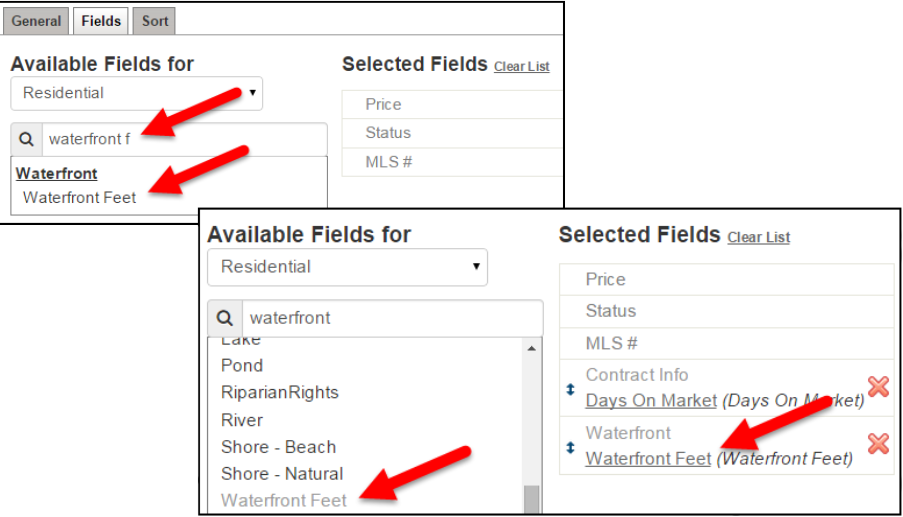
To add a Detail field to the view, click on the Fields tab. The Available Fields column on the left side contains Main fields and Detail fields that your MLS has made available for use in Views.
The fields are arranged under Group headings and you can scroll through the fields or type a field name into the search box.
Click on the field in the Available Fields column to add it to the Selected Fields list. Once chosen, the field will appear in the Selected Fields list and will also show the name of the Group to which is belongs. The field name will also remain under Available Fields, appearing in light grey type. If you want, you can reorder and rename the fields in the Selected Fields list.
After adding or changing the fields, make sure to click on Save at the top right. After saving, you will be brought back to the My Views page where your new view will be available in the list, or back to your Search Results page. You may now use this View on any search results page.Note: You cannot sort on a Detail field on the List tab. When a detail field appears on the List tab, it appears in black text indicating that the column header is neither clickable nor sortable. Only Main fields are able to be sorted on the List tab.
Subscribe to:
Posts (Atom)